What Is a Label Printer and Why Jewelry Businesses Need One?
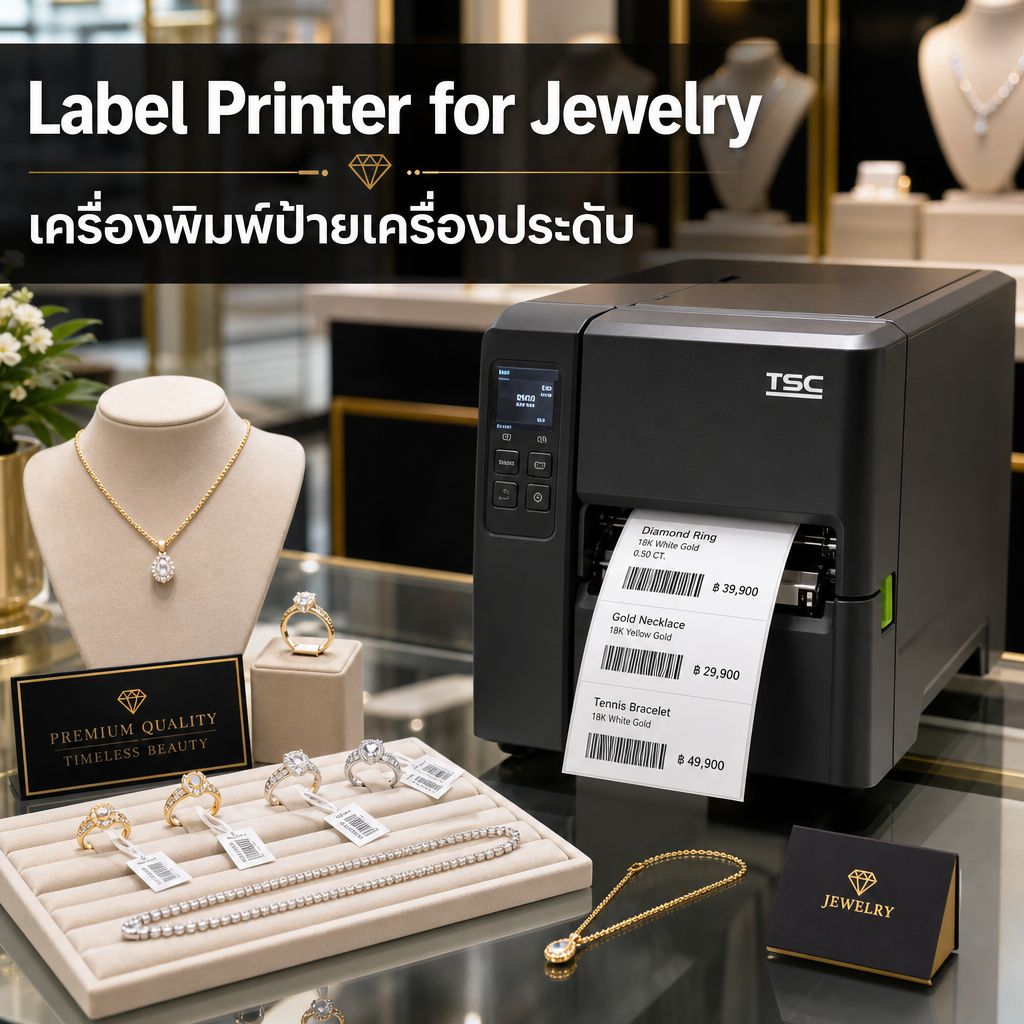
A label printer is a specialized device designed to print adhesive labels, tags, or stickers for products, shipping, or inventory management. For jewelry businesses, a label printer is not a luxury — it’s a necessity. Every ring, necklace, or bracelet needs a tag showing price, SKU, material composition, and often a barcode for point-of-sale scanning. Without a reliable label printer, jewelry retailers waste hours handwriting tags or outsourcing print jobs, which slows down operations and increases errors.
เครื่องพิมพ์ label คืออะไร และทำไมธุรกิจเครื่องประดับถึงต้องมี?
เครื่องพิมพ์ label คืออุปกรณ์เฉพาะทางที่ออกแบบมาเพื่อพิมพ์สติกเกอร์ ป้ายติดสินค้า หรือแท็กสำหรับสินค้า การจัดส่ง หรือการจัดการสต๊อก สำหรับธุรกิจเครื่องประดับ เครื่องพิมพ์ label ไม่ใช่ของฟุ่มเฟือย แต่เป็นสิ่งจำเป็น เพราะแหวน สร้อยคอ หรือกำไลทุกชิ้นต้องมีป้ายแสดงราคา รหัสสินค้า (SKU) ส่วนประกอบของวัสดุ และมักต้องมีบาร์โค้ดสำหรับสแกนที่จุดขาย หากไม่มีเครื่องพิมพ์ label ที่เชื่อถือได้ ร้านเครื่องประดับจะต้องเสียเวลาเขียนป้ายด้วยมือหรือจ้างพิมพ์ภายนอก ซึ่งทำให้การทำงานช้าลงและเกิดข้อผิดพลาดมากขึ้น
Types of Label Printers: Direct Thermal vs Thermal Transfer vs Inkjet vs Laser
Choosing the right printing technology affects durability, cost, and print quality. Here’s a detailed breakdown:
Direct Thermal Printers
Direct thermal printers use heat-sensitive paper that darkens when heated — no ink or ribbon required. They are ideal for short-term labels like shipping tags or temporary price stickers. However, direct thermal labels fade over time when exposed to heat, sunlight, or friction, making them less suitable for jewelry tags meant to last months on display.
Thermal Transfer Printers
Thermal transfer printers use a ribbon (wax, resin, or wax-resin) melted onto the label material, producing sharp, long-lasting prints resistant to fading, scratching, and moisture. This is the preferred technology for jewelry tags since labels often need to survive months of handling, humidity, and display lighting without degrading.
Inkjet Label Printers
Inkjet printers spray liquid ink onto label stock, offering vibrant full-color printing — useful for branded tags with logos or colored accents. The downside is higher cost per label and sensitivity to water unless using pigment-based waterproof ink cartridges.
Laser Label Printers
Laser printers use toner fused onto the label via heat, resulting in crisp text and barcodes with excellent smudge resistance. They’re a good middle-ground option for businesses that print in bulk batches rather than continuously, though the initial machine cost is generally higher than thermal printers.
ประเภทของเครื่องพิมพ์ label: Direct Thermal เทียบกับ Thermal Transfer, Inkjet และ Laser
การเลือกเทคโนโลยีการพิมพ์ที่เหมาะสมส่งผลต่อความทนทาน ต้นทุน และคุณภาพการพิมพ์ นี่คือรายละเอียดเชิงลึก:
เครื่องพิมพ์ Direct Thermal
เครื่องพิมพ์ direct thermal ใช้กระดาษที่ไวต่อความร้อนซึ่งจะเข้มขึ้นเมื่อโดนความร้อน ไม่ต้องใช้หมึกหรือริบบอน เหมาะสำหรับป้ายระยะสั้น เช่น ป้ายจัดส่งหรือสติกเกอร์ราคาชั่วคราว อย่างไรก็ตาม ป้าย direct thermal จะจางลงเมื่อเวลาผ่านไปเมื่อโดนความร้อน แสงแดด หรือการเสียดสี ทำให้ไม่เหมาะกับแท็กเครื่องประดับที่ต้องอยู่บนหน้าร้านเป็นเวลาหลายเดือน
เครื่องพิมพ์ Thermal Transfer
เครื่องพิมพ์ thermal transfer ใช้ริบบอน (แว็กซ์ เรซิน หรือแว็กซ์-เรซิน) ที่ละลายลงบนวัสดุป้าย ให้ผลพิมพ์ที่คมชัดและทนทานต่อการจางสี รอยขีดข่วน และความชื้น นี่คือเทคโนโลยีที่นิยมใช้สำหรับแท็กเครื่องประดับ เพราะป้ายมักต้องทนต่อการสัมผัสหลายเดือน ความชื้น และแสงไฟจัดแสดงโดยไม่เสื่อมสภาพ
เครื่องพิมพ์ Inkjet
เครื่องพิมพ์ inkjet ใช้การพ่นหมึกเหลวลงบนวัสดุป้าย ให้สีสันสดใสแบบเต็มรูปแบบ เหมาะสำหรับแท็กที่มีโลโก้แบรนด์หรือสีสันเฉพาะ ข้อเสียคือต้นทุนต่อป้ายสูงกว่าและไวต่อน้ำ เว้นแต่จะใช้ตลับหมึกกันน้ำแบบพิกเมนต์
เครื่องพิมพ์ Laser
เครื่องพิมพ์เลเซอร์ใช้ผงหมึก (toner) ที่หลอมติดบนป้ายด้วยความร้อน ให้ตัวอักษรและบาร์โค้ดที่คมชัดและทนต่อการเลอะเลือน เป็นตัวเลือกที่ดีสำหรับธุรกิจที่พิมพ์เป็นชุดจำนวนมากมากกว่าพิมพ์ต่อเนื่อง แม้ว่าต้นทุนเครื่องเริ่มต้นจะสูงกว่าเครื่องพิมพ์ thermal โดยทั่วไป
Key Specifications to Consider: DPI, Print Width, Speed, Connectivity
When comparing label printer models, four specifications matter most for jewelry retail applications:
DPI (Dots Per Inch) — Print Resolution
DPI determines print sharpness. For small jewelry tags with tiny text and dense barcodes, 203 DPI is the minimum acceptable resolution, but 300 DPI is strongly recommended for crisp, scannable barcodes on small label formats (under 1 inch wide).
Print Width and Label Size Compatibility
Jewelry tags are typically small — often 20mm x 30mm or smaller. Ensure your printer supports narrow-width label rolls (as small as 15mm) without requiring adapters, since many industrial printers are built for 4-inch shipping labels by default.
Print Speed
Measured in inches per second (IPS), speeds range from 2 IPS (compact desktop models) to 14 IPS (industrial models). For a boutique jewelry store printing under 200 tags daily, 3–5 IPS is sufficient. High-volume wholesalers should look for 6+ IPS.
Connectivity Options
Modern label printers offer USB, Bluetooth, Wi-Fi, and Ethernet connections. Bluetooth is convenient for mobile POS systems at trade shows, while Wi-Fi/Ethernet suits fixed retail counters integrated with inventory software.
สเปคสำคัญที่ต้องพิจารณา: DPI ความกว้างการพิมพ์ ความเร็ว และการเชื่อมต่อ
เมื่อเปรียบเทียบรุ่นเครื่องพิมพ์ label มีสเปค 4 อย่างที่สำคัญที่สุดสำหรับการใช้งานในธุรกิจเครื่องประดับ:
DPI (จุดต่อนิ้ว) — ความละเอียดการพิมพ์
DPI กำหนดความคมชัดของงานพิมพ์ สำหรับแท็กเครื่องประดับขนาดเล็กที่มีตัวอักษรจิ๋วและบาร์โค้ดหนาแน่น 203 DPI คือความละเอียดขั้นต่ำที่ยอมรับได้ แต่แนะนำอย่างยิ่งให้ใช้ 300 DPI เพื่อให้ได้บาร์โค้ดที่คมชัดและสแกนได้บนป้ายขนาดเล็ก (ต่ำกว่า 1 นิ้ว)
ความกว้างการพิมพ์และความเข้ากันได้กับขนาดป้าย
แท็กเครื่องประดับมักมีขนาดเล็ก มักอยู่ที่ 20มม x 30มม หรือเล็กกว่า ควรตรวจสอบว่าเครื่องพิมพ์รองรับม้วนป้ายความกว้างแคบ (เล็กสุดถึง 15มม) โดยไม่ต้องใช้อะแดปเตอร์ เพราะเครื่องพิมพ์อุตสาหกรรมหลายรุ่นถูกออกแบบมาสำหรับป้ายจัดส่งขนาด 4 นิ้วเป็นค่าเริ่มต้น
ความเร็วการพิมพ์
วัดเป็นนิ้วต่อวินาที (IPS) ความเร็วมีตั้งแต่ 2 IPS (รุ่นเดสก์ท็อปขนาดกะทัดรัด) ถึง 14 IPS (รุ่นอุตสาหกรรม) สำหรับร้านเครื่องประดับบูติกที่พิมพ์ต่ำกว่า 200 แท็กต่อวัน 3-5 IPS ก็เพียงพอแล้ว ผู้ค้าส่งปริมาณมากควรมองหารุ่นที่ 6 IPS ขึ้นไป
ตัวเลือกการเชื่อมต่อ
เครื่องพิมพ์ label สมัยใหม่มีการเชื่อมต่อ USB, Bluetooth, Wi-Fi และ Ethernet Bluetooth สะดวกสำหรับระบบ POS เคลื่อนที่ในงานแสดงสินค้า ในขณะที่ Wi-Fi/Ethernet เหมาะกับเคาน์เตอร์ร้านค้าประจำที่เชื่อมต่อกับซอฟต์แวร์จัดการสต๊อก
Top Label Printer Models for Jewelry Retail (Comparison Table)
Below is a comparison of popular models suited for jewelry tag printing based on specifications and typical retail pricing:
| Model | Technology | DPI | Max Speed | Connectivity | Best For |
|---|---|---|---|---|---|
| Zebra ZD421 | Thermal Transfer | 300 | 6 IPS | USB, Bluetooth, Wi-Fi | Small-medium jewelry shops |
| TSC TE244 | Thermal Transfer | 203 | 5 IPS | USB, Ethernet | Budget-conscious retailers |
| Brother QL-820NWB | Direct Thermal | 300 | 5 IPS | USB, Wi-Fi, Bluetooth | Mobile/temporary tagging |
| Epson ColorWorks C831 | Inkjet (Color) | 360 | 4 IPS | USB, Ethernet | Branded full-color tags |
รุ่นเครื่องพิมพ์ label แนะนำสำหรับธุรกิจเครื่องประดับ (ตารางเปรียบเทียบ)
ด้านล่างคือการเปรียบเทียบรุ่นยอดนิยมที่เหมาะกับการพิมพ์แท็กเครื่องประดับ อ้างอิงจากสเปคและราคาตลาดทั่วไป:
| รุ่น | เทคโนโลยี | DPI | ความเร็วสูงสุด | การเชื่อมต่อ | เหมาะสำหรับ |
|---|---|---|---|---|---|
| Zebra ZD421 | Thermal Transfer | 300 | 6 IPS | USB, Bluetooth, Wi-Fi | ร้านเครื่องประดับขนาดเล็ก-กลาง |
| TSC TE244 | Thermal Transfer | 203 | 5 IPS | USB, Ethernet | ร้านค้าที่คำนึงถึงงบประมาณ |
| Brother QL-820NWB | Direct Thermal | 300 | 5 IPS | USB, Wi-Fi, Bluetooth | งานติดแท็กเคลื่อนที่/ชั่วคราว |
| Epson ColorWorks C831 | Inkjet (สี) | 360 | 4 IPS | USB, Ethernet | แท็กแบรนด์สีเต็มรูปแบบ |
Cost Per Label Analysis: What’s the Real Price?
Beyond the printer’s upfront cost, ongoing consumable expenses determine your true cost per label. Thermal transfer setups typically cost $0.02–$0.05 per label including ribbon and label stock, while inkjet color labels run $0.08–$0.15 per label due to ink cartridge costs. Direct thermal is cheapest at print time ($0.01–$0.03) but has a shorter usable lifespan, which may require reprinting and negate savings for jewelry items kept in inventory long-term.
For jewelry businesses printing thousands of tags monthly, thermal transfer offers the best balance of durability and cost-efficiency. Sourcing high-quality pre-cut jewelry tags and label stickers also reduces waste — this is where suppliers like Jewelkara become valuable, offering premium color tags designed specifically to work seamlessly with thermal transfer printers.
การวิเคราะห์ต้นทุนต่อป้าย: ราคาที่แท้จริงเป็นเท่าไร?
นอกเหนือจากต้นทุนเครื่องพิมพ์เริ่มต้น ค่าใช้จ่ายวัสดุสิ้นเปลืองต่อเนื่องเป็นตัวกำหนดต้นทุนที่แท้จริงต่อป้าย ระบบ thermal transfer มักมีต้นทุนประมาณ 0.02-0.05 ดอลลาร์ต่อป้าย รวมริบบอนและวัสดุป้าย ในขณะที่ป้ายสี inkjet อยู่ที่ 0.08-0.15 ดอลลาร์ต่อป้าย เนื่องจากต้นทุนตลับหมึก direct thermal ถูกที่สุดตอนพิมพ์ (0.01-0.03 ดอลลาร์) แต่มีอายุการใช้งานสั้นกว่า ซึ่งอาจต้องพิมพ์ซ้ำและทำให้ประหยัดน้อยลงสำหรับสินค้าเครื่องประดับที่เก็บในสต๊อกระยะยาว
สำหรับธุรกิจเครื่องประดับที่พิมพ์แท็กหลายพันชิ้นต่อเดือน thermal transfer ให้ความสมดุลที่ดีที่สุดระหว่างความทนทานและความคุ้มค่า การจัดหาแท็กเครื่องประดับและสติกเกอร์ป้ายคุณภาพสูงที่ตัดมาสำเร็จก็ช่วยลดของเสียด้วย นี่คือจุดที่ซัพพลายเออร์อย่าง Jewelkara มีคุณค่า เพราะพวกเขานำเสนอแท็กสีพรีเมียมที่ออกแบบมาให้ทำงานร่วมกับเครื่องพิมพ์ thermal transfer ได้อย่างราบรื่น
Maintenance Tips to Extend Printer Lifespan
Regular maintenance prevents costly downtime. Follow these practices:
- Clean the print head weekly using isopropyl alcohol wipes to remove adhesive residue and dust buildup.
- Calibrate sensors after changing label stock types to ensure accurate label detection and prevent misprints.
- Store ribbons and labels in a cool, dry place away from direct sunlight to prevent warping or ribbon separation.
- Update firmware periodically for compatibility with new POS software integrations.
- Replace platen rollers every 12–18 months in high-volume environments to maintain print quality.
เคล็ดลับการบำรุงรักษาเพื่อยืดอายุการใช้งานเครื่องพิมพ์
การบำรุงรักษาสม่ำเสมอช่วยป้องกันการหยุดทำงานที่มีค่าใช้จ่ายสูง ปฏิบัติตามแนวทางเหล่านี้:
- ทำความสะอาดหัวพิมพ์ทุกสัปดาห์ ด้วยผ้าเช็ดแอลกอฮอล์ไอโซโพรพิลเพื่อขจัดคราบกาวและฝุ่นสะสม
- ปรับเทียบเซ็นเซอร์ หลังเปลี่ยนประเภทวัสดุป้ายเพื่อให้การตรวจจับป้ายแม่นยำและป้องกันการพิมพ์ผิดพลาด
- เก็บริบบอนและป้าย ในที่เย็นแห้งห่างจากแสงแดดโดยตรงเพื่อป้องกันการบิดงอหรือริบบอนแยกชั้น
- อัปเดตเฟิร์มแวร์ เป็นระยะเพื่อความเข้ากันได้กับซอฟต์แวร์ POS ใหม่
- เปลี่ยนลูกกลิ้งแท่นพิมพ์ (platen roller) ทุก 12-18 เดือนในสภาพแวดล้อมที่ใช้งานหนักเพื่อรักษาคุณภาพการพิมพ์
Final Recommendation
For most jewelry retailers, a thermal transfer label printer with 300 DPI resolution strikes the ideal balance between print quality, durability, and cost efficiency. Pair your printer investment with high-quality, pre-designed jewelry tags to maximize presentation value and minimize waste. We recommend exploring


 Mr.ThaiCert